Category Archives: RAC

Indexes Can Check-Out Anytime, But Can They Leave?

When I think about indexes in any DBMS, I immediately think about the lyrics in the Eagles song “Hotel California”.

“You can check-out any time you like, but you can never leave…..”

Almost every system that has been around for a while is over indexed. Every index costs something to maintain and some more than others. Also, systems and code change. There could be an index that was once needed, but over time the code shifts to use another one thats more efficient instead. Guess what though, you are still maintaining that old index. That costs CPU, I/O which translates into TIME.

Thankfully in Oracle 12.2, they have introduced a feature called INDEX USAGE TRACKING. In older versions this was called INDEX MONITORING and it was much harder and invasive to use. In the newer versions, it just works and you can read more about both options here:

https://oracle-base.com/articles/12c/index-usage-tracking-12cr2

By default, indexes in the views “DBA_INDEX_USAGE” and “V$INDEX_USAGE_INFO”. The “V$” table is flushed to the “DBA” table every 15 minutes. For most purposes, using the “DBA” table is just fine. The thing to remember is that querying only these tables tell you the indexes that are being USED, not the ones that are NOT USED. To get the ones that are not used, we just need to expand the query a bit:

SELECT
    di.owner,
    di.index_name,
    di.index_type,
    di.table_name
FROM
    dba_indexes di
WHERE
             di.owner in (select username from dba_users where oracle_maintained = 'N')
    AND di.uniqueness = 'NONUNIQUE'
    AND NOT EXISTS (
        SELECT
            1
        FROM
            dba_index_usage iu
        WHERE
                iu.owner = di.owner
            AND iu.name = di.index_name
    )
GROUP BY
    di.owner,
    di.index_name,
    di.index_type,
    di.table_name
ORDER BY
    di.owner,
    di.table_name,
    di.index_name;

Now that we have the indexes that are not used, which ones have the biggest impact on database operations? We just expand the query again to leverage the “DBA_TAB_MODIFICATIONS” table. This will allow us to see how many operations occur on each table that the index sits on:

SELECT
    di.owner,
    di.index_name,
    di.index_type,
    di.table_name,
    SUM(tm.inserts + tm.updates + tm.deletes) operations
FROM
    dba_indexes di,
    dba_tab_modifications tm
WHERE
             di.owner in (select username from dba_users where oracle_maintained = 'N')
    AND di.owner = tm.table_owner
    AND di.table_name = tm.table_name
    AND di.uniqueness = 'NONUNIQUE'
    AND NOT EXISTS (
        SELECT
            1
        FROM
            dba_index_usage iu
        WHERE
                iu.owner = di.owner
            AND iu.name = di.index_name
    )
GROUP BY
    di.owner,
    di.index_name,
    di.index_type,
    di.table_name
ORDER BY
    SUM(tm.inserts + tm.updates + tm.deletes) ASC NULLS FIRST,
    di.owner,
    di.table_name,
    di.index_name;

Now, I have done an equi-join condition against the DBA_TAB_MODIFICATIONS so this is only showing us unused indexes against tables that the system has recorded operations against. If you wanted to show all indexes regardless if there were operations or not, then just change the join condition against DBA_TAB_MODIFICATIONS to be an outer join.

In my case, there were some very large indexes that were unused sitting on tables that had LOTS of operations (names changed to protect the innocent):

OWNERINDEX NAMEINDEX TYPETABLE NAMEOPERATIONS
HRFK_1_IDXNORMALEMPLOYEES295931545
HR1EMP_TOTFUNCTION-BASED NORMALEMP_HOURS1374288673
HR2EMP_TOTFUNCTION-BASED NORMALEMP_HOURS1425114200
HR3EMP_TOTFUNCTION-BASED NORMALEMP_HOURS2487284020

Adding “OPERATIONS” to the query now gives us some sense of the “BENEFIT” of dropping the index. Based on the results you can present your case for dropping the index. People always love to have the “BENEFIT” quantified and this is the closest thing you can do without performing a session trace which could prove to be invasive and fairly difficult to get the exact statement you are looking for.

Hopefully this will give you the additional information you need to advocate for dropping that index that is no longer being used.

Using FLEX ASM Disk Groups to Regain Storage Space

I recently came across an issue where a client was using more space than they anticipated in one of their Exadata Cloud Service Instances within OCI. Unlike an on-premise Exadata, when that machine is delivered in OCI, you do not have the ability to specify the redundancy of the disk groups as they are always delivered with the disk groups set to HIGH redundancy. This level of redundancy is perfect for Production or DR type environments, but sometimes it may be worthwhile in a Test environment to have the ability to free up space by reducing the redundancy. This option also doesn’t require the full tear down of a disk group to rebuild it with the redundancy of your choice. Certainly a savings of downtime and man-hours.

Specific to this problem, the FLEX ASM disk group allows you to specify the redundancy to use at the filetype level within a given file group. There are many other settings that can be adjusted, but none of them are as potentially as useful as the redundancy option. To make things easier, a file group is automatically created within ASM for each Container and Pluggable database. This granularity allows a ton of flexibility should you find this feature useful for you.

There are several other blogs out there that discuss this, however, none that I came across showed space numbers or the file group properties.

Now to demonstrate how it works, I will start with a simple 19c database that contains the sample HR data and some other sample data consuming about 8GB. (For the purposes of this test, the disk group has already been converted to FLEX. At HIGH redundancy the space used is as follows:

StateTypeRebalSectorBlockAUTotal_MBFree_MBName
MOUNTEDFLEXN512409641943049214863352DATA/

Further information can be seen about the individual data files and its redundancy property by querying the files within the specified file group:

sqlplus / as sysasm
select file_number,round(bytes/1024/1024) file_size, round(space/1024/1024) disk_size,type,redundancy from v$asm_file where filegroup_number = 3;
FILE_NUMBERFILE_SIZE_MBDISK_SIZE_MBTYPEREDUNDANCY
275100324DATAFILEHIGH
276270828DATAFILEHIGH
2773401044DATAFILEHIGH
27815134585TEMPFILEHIGH
279524DATAFILEHIGH
280512015384DATAFILEHIGH

Now, we can convert the datafilee in the disk group to MIRROR (NORMAL) redundancy. In order to see the full results, an ASM Rebalance Operation will need to occur which could take some time:

sqlplus / as sysasm
alter diskgroup DATA  modify filegroup VBOXDB1_PDB1  set 'datafile.redundancy' = 'mirror';

Now, once the rebalance finishes, we can query the size of the data files and the disk group:

StateTypeRebalSectorBlockAUTotal_MBFree_MBName
MOUNTEDFLEXN512409641943049214869204DATA/
FILE_NUMBERFILE_SIZE_MBDISK_SIZE_MBTYPEREDUNDANCY
275100220DATAFILEMIRROR
276270556DATAFILEMIRROR
277340700DATAFILEMIRROR
27815134585TEMPFILEHIGH
279516DATAFILEMIRROR
280512010260DATAFILEMIRROR

As you can see, only the data files were effected for a space savings within the disk group of approximately 5.7GB.

Of course there are potential availability drawbacks with changing disk group redundancy, however, if your situation takes the pros and the cons into account, the ASM FLEX disk group may be a good alternative for your environment.

Ephemeral Ports and Oracle RAC Interconnect

Building upon my previous post “Ulimit nofiles Unlimited. Why not?“, ensuring that there are enough Ephemeral Ports for Interconnect Traffic is important.  As a matter of fact, it’s part of the prerequisite checks for RAC installation.  But what are they and why are they important? For purposes of this post I won’t deal with excessive interconnect traffic, but instead I will deal with latency caused by the lack of ephemeral ports.

Simply explained, ephemeral ports are the short-lived transport protocol ports for Internet Protocol (IP) communications.  Oracle RAC interconnect traffic specifically utilizes the User Datagram Protocol (UDP) as the port assignment for the client end of a client-server communication to a well-known port list (Oracle suggests a specific port range) on a server.  What that means is, when a client initiates a request it choose a random port from ephemeral port range and it expects the response at that port only.  Since interconnect traffic is usually short lived and frequent, there need to be enough ports available to ensure timely communication.  If there are not enough ports available for the needed interconnect traffic, interconnect latency can occur.

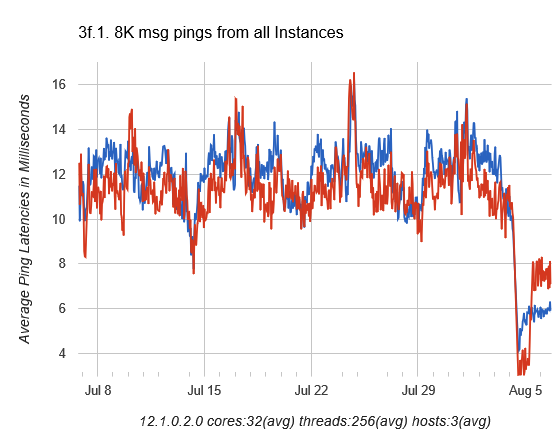
In this case, while performing a healthcheck on a system we immediately noticed an issue with the interconnect manifesting itself in AWR as long ping times between nodes as seen in dba_hist_interconnect_pings:

ping-stats-4hr-before

In my experience, in a system that has the interconnect tuned well and not a ton of cross instance traffic, these should be in the 5ms or less range.

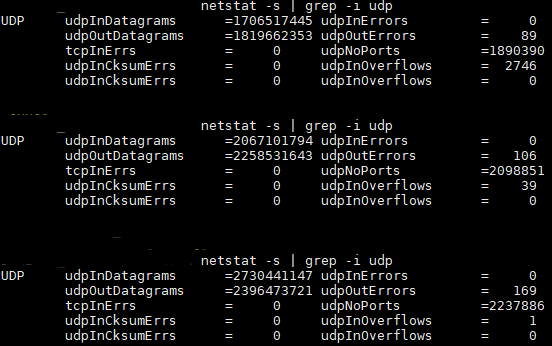
So we started to check all of the usual suspects such as NIC and DNS issues.  One thing we did find was that the private addresses were missing from /etc/hosts so that could contribute some of the latency right?  While adding those helped smooth out the spikes, it didn’t address the entire issue.  So as part of my problem solving process, next I just started poking around with the “netstat” command to see if anything turned up there and most certainly something did:

udpNoPorts-Example-pre

udpNoPorts… What’s that and why is that so high?  That led me to check prerequisites and ultimately ephemeral port ranges.  Sure enough, they were set incorrectly so the the system was waiting on available ports to send interconnect traffic thus causing additional latency.

Oracle specifies the following settings for Solaris 11 and above.  They are set using “ipadm set-prop”:

"tcp_smallest_anon_port"  = 9000
"udp_smallest_anon_port" = 9000
"tcp_largest_anon_port"  = 65500
"udp_largest_anon_port" = 65500

In this case they were set to:

"tcp_smallest_anon_port" = 32768
"udp_smallest_anon_port" = 32768
"tcp_largest_anon_port" = 60000
"udp_largest_anon_port" = 60000

If you were using Linux, the configuration parameter in “sysctl.conf” would be:

 
net.ipv4.ip_local_port_range = 9000 65500 

After correcting the settings, we were able to cut the latency in half:

ping-stats-4hr-after

Interconnect post fix

Now, we still have some work to do because the interconnect latency is still higher than desired, but we are now likely dealing with the way the application connects to the database and is not RAC aware vs. an actual hardware or network issue.

Incremental improvement is always welcomed!

Local Listener vs. Remote Listener vs. Listener Networks

Introduction:

Often, when it comes to the database, you may see separate networks configured for the following types of traffic:

  • Backups
  • Management
  • Client

Recently, one of the configurations that I was a part of took it a step further than that and had a few additional networks configured:

  • Data Guard
  • Private Non-Routed Network

One additional requirement was that a scan listener be present for each one of these networks. I wasn’t given the opportunity to set this up either so we had to trust that the other entity set all of the correct parameters.  No big deal right?


The Problem:

Once all of the networks were configured and scan listeners were in place for each network, connectivity on each network was very erratic.  Clients would connect at times and at other times they would not.

It wasn’t until we used a  packet analyzer (Wireshark), that we really saw what was going on.  Upon investigation, a colleague found that occasionally the scan listener would return the wrong VIP to the connecting client.  Good news was that it was the SAME wrong VIP each time.  But why was it doing this?  The culprit ended up being incorrect / missing entries in the following parameters.

  • REMOTE_LISTENER
  • LOCAL_LISTENER
  • LISTENER_NETWORKS

The Oracle documentation on this was not a ton of help either.

The Solution:

Upon investigation, we found that an entry for each local listener was present in the LOCAL_LISTENER parameter and each SCAN_LISTENER was present in the REMOTE_LISTENER parameter and LISTENER_NETWORKS parameter was blank.  As it turns out, LOCAL_LISTENER and REMOTE_LISTENER should contain entries for those listeners present on the first network ONLY.

Incorrect Parameters:

local_listener='(ADDRESS_LIST=(ADDRESS=(PROTOCOL=TCP)(HOST=client-vip.example.com)(PORT=1534))(ADDRESS=(PROTOCOL=TCP)(HOST=vlan-vip.example.com)(PORT=1534)))'
remote_listener='client-scan:1534','vlan-scan:1534'
listener_networks=''

The LISTENER_NETWORKS parameter is responsible for registration of listeners for ALL other networks.

Correct Parameters:

local_listener='(ADDRESS=(PROTOCOL=TCP)(HOST=client-vip.example.com)(PORT=1534))'
remote_listener='client-scan:1534'
listener_networks='((NAME=netVLAN)(LOCAL_LISTENER=(DESCRIPTION=(ADDRESS=(PROTOCOL=TCP)(HOST=vlan-vip.example.com)(PORT=1534))))(REMOTE_LISTENER=vlan-scan:1534))'

Once these changes were made, the intermittent connection issues were gone and Wireshark confirmed that the listeners were returning the correct VIP for the network being requested.