
Building upon my previous post “Ulimit nofiles Unlimited. Why not?“, ensuring that there are enough Ephemeral Ports for Interconnect Traffic is important. As a matter of fact, it’s part of the prerequisite checks for RAC installation. But what are they and why are they important? For purposes of this post I won’t deal with excessive interconnect traffic, but instead I will deal with latency caused by the lack of ephemeral ports.
Simply explained, ephemeral ports are the short-lived transport protocol ports for Internet Protocol (IP) communications. Oracle RAC interconnect traffic specifically utilizes the User Datagram Protocol (UDP) as the port assignment for the client end of a client-server communication to a well-known port list (Oracle suggests a specific port range) on a server. What that means is, when a client initiates a request it choose a random port from ephemeral port range and it expects the response at that port only. Since interconnect traffic is usually short lived and frequent, there need to be enough ports available to ensure timely communication. If there are not enough ports available for the needed interconnect traffic, interconnect latency can occur.
In this case, while performing a healthcheck on a system we immediately noticed an issue with the interconnect manifesting itself in AWR as long ping times between nodes as seen in dba_hist_interconnect_pings:
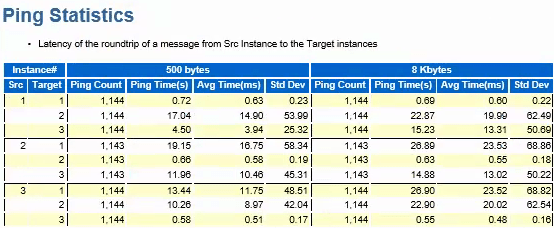
In my experience, in a system that has the interconnect tuned well and not a ton of cross instance traffic, these should be in the 5ms or less range.
So we started to check all of the usual suspects such as NIC and DNS issues. One thing we did find was that the private addresses were missing from /etc/hosts so that could contribute some of the latency right? While adding those helped smooth out the spikes, it didn’t address the entire issue. So as part of my problem solving process, next I just started poking around with the “netstat” command to see if anything turned up there and most certainly something did:
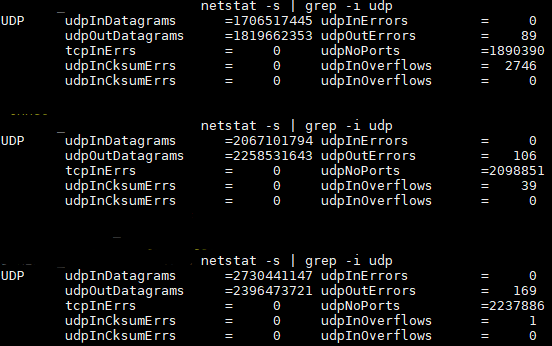
udpNoPorts… What’s that and why is that so high? That led me to check prerequisites and ultimately ephemeral port ranges. Sure enough, they were set incorrectly so the the system was waiting on available ports to send interconnect traffic thus causing additional latency.
Oracle specifies the following settings for Solaris 11 and above. They are set using “ipadm set-prop”:
"tcp_smallest_anon_port" = 9000 "udp_smallest_anon_port" = 9000 "tcp_largest_anon_port" = 65500 "udp_largest_anon_port" = 65500In this case they were set to:
"tcp_smallest_anon_port" = 32768 "udp_smallest_anon_port" = 32768 "tcp_largest_anon_port" = 60000 "udp_largest_anon_port" = 60000If you were using Linux, the configuration parameter in “sysctl.conf” would be:
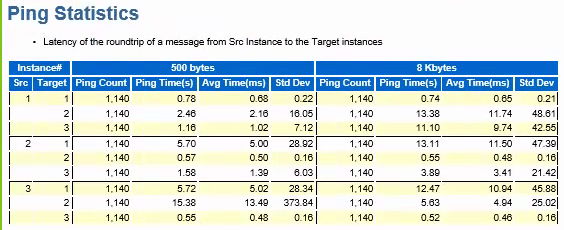
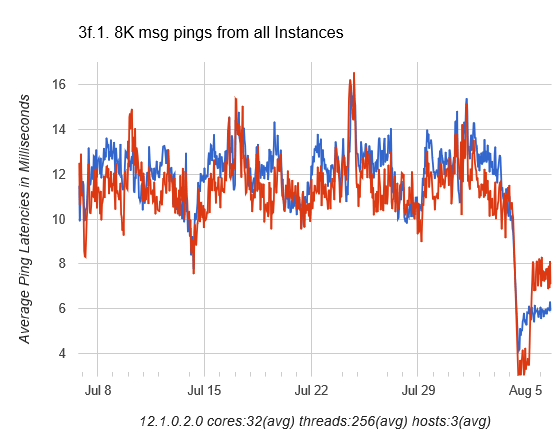
net.ipv4.ip_local_port_range = 9000 65500After correcting the settings, we were able to cut the latency in half:
Now, we still have some work to do because the interconnect latency is still higher than desired, but we are now likely dealing with the way the application connects to the database and is not RAC aware vs. an actual hardware or network issue.
Incremental improvement is always welcomed!

 🛩️ Shane Borden's Technology Blog