Category Archives: Linux

SQLPlus is Expensive!


I was recently tasked to work on a server that had severe performance issues. The first thing I noticed was that the server was, at times, running at a load average 3-4x and under steady state about 1.5x the number of cores on the host! Further investigation, yielded that there was a large quantity of SQPlus invocations from a set of ETL scripts. Digging even more, I found that the script performed ETL across more than 100 schemas 75% of which were done via parallel background processes with a random “sleep” built in.

This is where I noticed something interesting. Instead of coding the script to invoke SQLPlus once, run a bunch of statements and exit, the coder constructed the script to invoke SQLPlus, run a statement, exit, invoke SQLPlus, run a statement, and on and on and on.

My first thought was that this has to be EXPENSIVE right?

When a SQLPlus login is made, a lot of things happen. Simply stated, the OS has to start a database process, and the database has to do a bunch of things to get your session ready (password authentication, memory allocation, update some tables with login details, setup permissions), etc, etc. Managing processes is one of the most expensive things an Operating System can do.

In terms of the database itself, no less than 19 individual statements are executed in order to prepare your session. Digging into those statements, probably one of the most expensive is:

sql_id:  9zg9qd9bm4spu
update user$ set spare6=DECODE(to_char(:2, 'YYYY-MM-DD'), '0000-00-00', to_date(NULL), :2) where user#=:1


It can be so expensive, Oracle has actually logged a bug (Bug 33121934  Library cache lock / load lock / mutex x during connection storm due to update user$) where you can discontinue updating the last login time for every login and do it every X number of seconds. The explain plan for this statement is actually quite lengthy and there is a lot more work going on than you think!

So based on all of that, I headed back to my scripts only to discover for every invocation of the script (the script is invoked for each of the 114 schemas), there were a minimum of 11 SQLPlus invocations and a max of of 27 invocations depending on the schema. So every minute that this script was executed there was a total of almost 1400 SQLPlus Invocations!!! Definitely a big contributor to the very high load average on the server.

As with anything in IT, change is tough and there’s hardly ever much appetite to change something that “works”. That is where it is important to always quantify the benefits. So to do this I wrote a quick script to show the difference in CPU Utilization for a script that does many SQLPlus invocations vs one that does one invocation and then calls many sql scripts.

The resultant stats are as follows. For the original script in the test system I used had one SQLPlus invocation for each sql file that was called, the following resources were used. The original script executed SQLPlus 61 times and yielded the following system usage:

real     0m0.876s
user     0m0.480s
sys      0m0.463s

The modified script that reduced the number of calls from 61 to 14 (77%) yielded the following system usage:

real     0m0.188s
user     0m0.117s
sys      0m0.085s

*** NOTE: The test system I was working on had no data to manipulate for ETL so most of the work was the SQLPlus call. Which is what I wanted to demonstrate anyway!

As you can see, reducing the number of SQLPlus calls by 77%, reduced system usage by:

  • real: 79%
  • user: 75%
  • sys: 82%

So with a small change to group sql statements into one SQLPlus call, we are able to drastically improve system stability and reduce resource utilization. A WIN in my book! Once this gets through the test cycles, I will follow up with a post on the improvement seen in production.

Migration of a Single PDB to a Different Endian Platform – Is it Possible?

Seeing that I do lots of migrations throughout the course of my job, its always good to explore some of the newer features so that you are familiar with them and feel good about putting them into your tool-bag for future use. One of the things that I could see being useful is the ability to migrate a single PDB from one platform to the other. Upon researching the possibilities, I found that migrating and converting the endianness of a PDB really wasn’t documented. What was documented was a process to migrate a PDB from one platform to another when endianness is the same between platforms.

Given that, I wanted to see if the process for converting an entire container using transportable tablespaces could be applied to a single PDB. Unfortunately there is downtime required, but here is what I found:

Create Backup of Source PDB

Determine for a given user what tablespaces are impacted, check for any violations which may occur due to transport, set those tablespaces to read-only and then invoke RMAN by connecting to the PDB and take a backup:

SQL> select * from v$transportable_platform;
PLATFORM_ID PLATFORM_NAME                            ENDIAN_FORMAT      CON_ID
----------- ---------------------------------------- -------------- ----------
          2 Solaris[tm] OE (64-bit)                  Big                     0

SQL> exec SYS.DBMS_TTS.TRANSPORT_SET_CHECK(ts_list => 'HR_TEST', incl_constraints => TRUE);

PL/SQL procedure successfully completed.

SQL> SELECT * FROM transport_set_violations;

no rows selected


export NLS_DATE_FORMAT='DD-MON-YY HH24:MI:SS'
rman target sys@xttpdb

RMAN> alter tablespace hr_test read only;

using target database control file instead of recovery catalog
Statement processed

RMAN> alter tablespace users read only;

Statement processed

RUN
{
ALLOCATE CHANNEL XPLATFORM_BKUP_DISK1 DEVICE TYPE DISK;
ALLOCATE CHANNEL XPLATFORM_BKUP_DISK2 DEVICE TYPE DISK;
BACKUP TO PLATFORM 'Linux x86 64-bit' AS COMPRESSED BACKUPSET FILESPERSET 1
   FORMAT '/export/home/oracle/backups/%d_xplat_bs%s_piece%p_%T_%U.bkp'
   DATAPUMP FORMAT '/export/home/oracle/backups/transport_tblsp_hr_test_meta.dmp'
   TABLESPACE HR_TEST, USERS;
RELEASE CHANNEL XPLATFORM_BKUP_DISK1;
RELEASE CHANNEL XPLATFORM_BKUP_DISK2;
}

allocated channel: XPLATFORM_BKUP_DISK1
channel XPLATFORM_BKUP_DISK1: SID=752 instance=xttsun1 device type=DISK

allocated channel: XPLATFORM_BKUP_DISK2
channel XPLATFORM_BKUP_DISK2: SID=745 instance=xttsun1 device type=DISK

Starting backup at 29-OCT-20
Running TRANSPORT_SET_CHECK on specified tablespaces
TRANSPORT_SET_CHECK completed successfully

Performing export of metadata for specified tablespaces...
   EXPDP> Starting "SYS"."TRANSPORT_EXP_XTTSUN_aahC":
   EXPDP> Processing object type TRANSPORTABLE_EXPORT/INDEX_STATISTICS
   EXPDP> Processing object type TRANSPORTABLE_EXPORT/TABLE_STATISTICS
   EXPDP> Processing object type TRANSPORTABLE_EXPORT/STATISTICS/MARKER
   EXPDP> Processing object type TRANSPORTABLE_EXPORT/PLUGTS_BLK
   EXPDP> Processing object type TRANSPORTABLE_EXPORT/POST_INSTANCE/PLUGTS_BLK
   EXPDP> Processing object type TRANSPORTABLE_EXPORT/TABLE
   EXPDP> Processing object type TRANSPORTABLE_EXPORT/INDEX/INDEX
   EXPDP> Processing object type TRANSPORTABLE_EXPORT/CONSTRAINT/CONSTRAINT
   EXPDP> Processing object type TRANSPORTABLE_EXPORT/COMMENT
   EXPDP> Processing object type TRANSPORTABLE_EXPORT/CONSTRAINT/REF_CONSTRAINT
   EXPDP> Processing object type TRANSPORTABLE_EXPORT/TRIGGER
   EXPDP> Master table "SYS"."TRANSPORT_EXP_XTTSUN_aahC" successfully loaded/unloaded
   EXPDP> ******************************************************************************
   EXPDP> Dump file set for SYS.TRANSPORT_EXP_XTTSUN_aahC is:
   EXPDP>   /u01/app/oracle/product/12.2.0/dbhome_1/dbs/backup_tts_XTTSUN_66977.dmp
   EXPDP> ******************************************************************************
   EXPDP> Datafiles required for transportable tablespace HR_TEST:
   EXPDP>   +DATAC1/XTTSUN/B2A8DA5A8E2A777EE0540010E05D13EA/DATAFILE/hr_test.302.1054902701
   EXPDP> Datafiles required for transportable tablespace USERS:
   EXPDP>   +DATAC1/XTTSUN/B2A8DA5A8E2A777EE0540010E05D13EA/DATAFILE/users.435.1054891719
   EXPDP> Job "SYS"."TRANSPORT_EXP_XTTSUN_aahC" successfully completed at Thu Oct 29 13:14:42 2020 elapsed 0 00:02:17
Export completed

channel XPLATFORM_BKUP_DISK1: starting compressed full datafile backup set
channel XPLATFORM_BKUP_DISK1: specifying datafile(s) in backup set
input datafile file number=00018 name=+DATAC1/XTTSUN/B2A8DA5A8E2A777EE0540010E05D13EA/DATAFILE/hr_test.302.1054902701
channel XPLATFORM_BKUP_DISK1: starting piece 1 at 29-OCT-20
channel XPLATFORM_BKUP_DISK2: starting compressed full datafile backup set
channel XPLATFORM_BKUP_DISK2: specifying datafile(s) in backup set
input datafile file number=00017 name=+DATAC1/XTTSUN/B2A8DA5A8E2A777EE0540010E05D13EA/DATAFILE/users.435.1054891719
channel XPLATFORM_BKUP_DISK2: starting piece 1 at 29-OCT-20
channel XPLATFORM_BKUP_DISK2: finished piece 1 at 29-OCT-20
piece handle=/export/home/oracle/backups/XTTSUN_xplat_bs36_piece1_20201029_14ve6dm4_1_1.bkp tag=TAG20201029T131156 comment=NONE
channel XPLATFORM_BKUP_DISK2: backup set complete, elapsed time: 00:00:03
channel XPLATFORM_BKUP_DISK1: finished piece 1 at 29-OCT-20
piece handle=/export/home/oracle/backups/XTTSUN_xplat_bs35_piece1_20201029_13ve6dm4_1_1.bkp tag=TAG20201029T131156 comment=NONE
channel XPLATFORM_BKUP_DISK1: backup set complete, elapsed time: 00:00:35
channel XPLATFORM_BKUP_DISK1: starting compressed full datafile backup set
input Data Pump dump file=/u01/app/oracle/product/12.2.0/dbhome_1/dbs/backup_tts_XTTSUN_66977.dmp
channel XPLATFORM_BKUP_DISK1: starting piece 1 at 29-OCT-20
channel XPLATFORM_BKUP_DISK1: finished piece 1 at 29-OCT-20
piece handle=/export/home/oracle/backups/transport_tblsp_hr_test_meta.dmp tag=TAG20201029T131156 comment=NONE
channel XPLATFORM_BKUP_DISK1: backup set complete, elapsed time: 00:00:01
Finished backup at 29-OCT-20

released channel: XPLATFORM_BKUP_DISK1

released channel: XPLATFORM_BKUP_DISK2

RMAN> exit

Copy Backup Files and Metadata File to New Platform

Using normal methods such as scp, copy the files generated by RMAN to the new platform. One caveat, is that until 19c, the data pump file for the metadata is copied to $ORACLE_HOME/dbs so you must make sure that you have sufficient space there for the process to complete successfully.

Restore / Convert Endian on New Platform

The last step in the process is the setup of the new PDB, creation of the user in the PDB and then use RMAN to transport the table spaces. The general process can be done simply by executing the following steps:

  • Create empty pluggable database and create target user in the new PDB:
SQL> select * from v$transportable_platform;
PLATFORM_ID PLATFORM_NAME                            ENDIAN_FORMAT      CON_ID
----------- ---------------------------------------- -------------- ----------
         13 Linux x86 64-bit                         Little                  0

SQL> CREATE PLUGGABLE DATABASE xttpdb ADMIN USER pdb_admin IDENTIFIED BY Welcome123 CREATE_FILE_DEST='+DATA';

Pluggable database created.

SQL> CREATE USER "HR" IDENTIFIED BY VALUES 'S:904B950378D93630E729A1A3051796718B7511BA10F5273F2F031E5CF76D;T:22D35135BC49EEAF5F4C896F26E2E8802D869C6451F39241BB4ACB76A38B7396E1C516DC78F0AFB1D3A96ABB761543673ABCF540CAC36927564F892FC148B436934AD38AD6D35C1EB8F3BB55F70BB02A'
DEFAULT TABLESPACE "USERS"
TEMPORARY TABLESPACE "TEMP"
PASSWORD EXPIRE
ACCOUNT LOCK;

SQL> GRANT "RESOURCE" TO "HR";

Grant succeeded.
SQL> GRANT CREATE SESSION TO "HR";

Grant succeeded.
SQL> GRANT ALTER SESSION TO "HR";

Grant succeeded.
SQL> GRANT UNLIMITED TABLESPACE TO "HR";

Grant succeeded.
SQL> GRANT CREATE SYNONYM TO "HR";

Grant succeeded.
SQL> GRANT CREATE VIEW TO "HR";

Grant succeeded.
SQL> GRANT CREATE SEQUENCE TO "HR";

Grant succeeded.
SQL> GRANT CREATE DATABASE LINK TO "HR";

Grant succeeded.
SQL> GRANT EXECUTE ON "SYS"."DBMS_STATS" TO "HR";

Grant succeeded.
SQL> ALTER USER "HR" DEFAULT ROLE ALL;

Grant succeeded.

  • Invoke RMAN and connect to the target PDB:

export NLS_DATE_FORMAT='DD-MON-YY HH24:MI:SS'
rman target sys@xttpdb

RUN
{
ALLOCATE CHANNEL XPLATFORM_BKUP_DISK1 DEVICE TYPE DISK;
ALLOCATE CHANNEL XPLATFORM_BKUP_DISK2 DEVICE TYPE DISK;
RESTORE
   ALL FOREIGN DATAFILES TO NEW
   FROM BACKUPSET '/archive/xttlnux/XTTSUN_xplat_bs36_piece1_20201029_14ve6dm4_1_1.bkp'
   BACKUPSET '/archive/xttlnux/XTTSUN_xplat_bs35_piece1_20201029_13ve6dm4_1_1.bkp'
   DUMP FILE FROM BACKUPSET '/archive/xttlnux/transport_tblsp_hr_test_meta.dmp';
RELEASE CHANNEL XPLATFORM_BKUP_DISK1;
RELEASE CHANNEL XPLATFORM_BKUP_DISK2;
}

using target database control file instead of recovery catalog
allocated channel: XPLATFORM_BKUP_DISK1
channel XPLATFORM_BKUP_DISK1: SID=512 instance=xttlnux2 device type=DISK

allocated channel: XPLATFORM_BKUP_DISK2
channel XPLATFORM_BKUP_DISK2: SID=615 instance=xttlnux1 device type=DISK

Starting restore at 29-OCT-20

channel XPLATFORM_BKUP_DISK1: starting datafile backup set restore
channel XPLATFORM_BKUP_DISK1: specifying datafile(s) to restore from backup set
channel XPLATFORM_BKUP_DISK1: restoring all foreign files in backup piece
channel XPLATFORM_BKUP_DISK1: reading from backup piece /archive/xttlnux/XTTSUN_xplat_bs36_piece1_20201029_14ve6dm4_1_1.bkp
channel XPLATFORM_BKUP_DISK2: starting datafile backup set restore
channel XPLATFORM_BKUP_DISK2: specifying datafile(s) to restore from backup set
channel XPLATFORM_BKUP_DISK2: restoring all foreign files in backup piece
channel XPLATFORM_BKUP_DISK2: reading from backup piece /archive/xttlnux/XTTSUN_xplat_bs35_piece1_20201029_13ve6dm4_1_1.bkp
channel XPLATFORM_BKUP_DISK1: restoring foreign file 17 to +DATA/XTTLNUX/B2A8DA5A8E2A777EE0540010E05D13EA/DATAFILE/users.929.1055079821
channel XPLATFORM_BKUP_DISK2: restoring foreign file 18 to +DATA/XTTLNUX/B2A8DA5A8E2A777EE0540010E05D13EA/DATAFILE/hr_test.928.1055079877
channel XPLATFORM_BKUP_DISK1: foreign piece handle=/archive/xttlnux/XTTSUN_xplat_bs36_piece1_20201029_14ve6dm4_1_1.bkp
channel XPLATFORM_BKUP_DISK1: restored backup piece 1
channel XPLATFORM_BKUP_DISK1: restore complete, elapsed time: 00:00:02
channel XPLATFORM_BKUP_DISK2: foreign piece handle=/archive/xttlnux/XTTSUN_xplat_bs35_piece1_20201029_13ve6dm4_1_1.bkp
channel XPLATFORM_BKUP_DISK2: restored backup piece 1
channel XPLATFORM_BKUP_DISK2: restore complete, elapsed time: 00:00:26
channel XPLATFORM_BKUP_DISK1: starting datafile backup set restore
channel XPLATFORM_BKUP_DISK1: specifying datafile(s) to restore from backup set
channel XPLATFORM_BKUP_DISK1: restoring Data Pump dump file to /u01/app/oracle/product/12.2.0.1/dbhome_1/dbs/backup_tts_XTTLNUX_32652.dmp
channel XPLATFORM_BKUP_DISK1: reading from backup piece /archive/xttlnux/transport_tblsp_hr_test_meta.dmp
channel XPLATFORM_BKUP_DISK1: foreign piece handle=/archive/xttlnux/transport_tblsp_hr_test_meta.dmp
channel XPLATFORM_BKUP_DISK1: restored backup piece 1
channel XPLATFORM_BKUP_DISK1: restore complete, elapsed time: 00:00:00

Performing import of metadata...
   IMPDP> Master table "SYS"."TSPITR_IMP_XTTLNUX_CFfw" successfully loaded/unloaded
   IMPDP> Starting "SYS"."TSPITR_IMP_XTTLNUX_CFfw":
   IMPDP> Processing object type TRANSPORTABLE_EXPORT/PLUGTS_BLK
   IMPDP> Processing object type TRANSPORTABLE_EXPORT/TABLE
   IMPDP> Processing object type TRANSPORTABLE_EXPORT/INDEX/INDEX
   IMPDP> Processing object type TRANSPORTABLE_EXPORT/CONSTRAINT/CONSTRAINT
   IMPDP> Processing object type TRANSPORTABLE_EXPORT/INDEX_STATISTICS
   IMPDP> Processing object type TRANSPORTABLE_EXPORT/COMMENT
   IMPDP> Processing object type TRANSPORTABLE_EXPORT/CONSTRAINT/REF_CONSTRAINT
   IMPDP> Processing object type TRANSPORTABLE_EXPORT/TRIGGER
   IMPDP> Processing object type TRANSPORTABLE_EXPORT/TABLE_STATISTICS
   IMPDP> Processing object type TRANSPORTABLE_EXPORT/STATISTICS/MARKER
   IMPDP> Processing object type TRANSPORTABLE_EXPORT/POST_INSTANCE/PLUGTS_BLK
   IMPDP> ORA-39082: Object type TRIGGER:"HR"."SECURE_EMPLOYEES" created with compilation warnings

ORA-39082: Object type TRIGGER:"HR"."UPDATE_JOB_HISTORY" created with compilation warnings

   IMPDP> Job "SYS"."TSPITR_IMP_XTTLNUX_CFfw" completed with 2 error(s) at Thu Oct 29 13:44:46 2020 elapsed 0 00:00:32
Import completed

Finished restore at 29-OCT-20

released channel: XPLATFORM_BKUP_DISK1

released channel: XPLATFORM_BKUP_DISK2

RMAN> exit

At this point, the tablespaces have been converted and plugged into the target PDB and all objects are ready for use!

Interesting Items of Note

Interestingly, after performing the above conversion and migration without any issues, and as I normally do, I started to poke around to see what “really” happened. When I did so I found something quite interesting. Upon looking at “v$datafile” I found that while RMAN did assign OMF filenames at restoration time, it assigned a totally different directory to those files than all of the other files in the PDB.

SQL> select file#, name from v$datafile;

     FILE# NAME
---------- ----------------------------------------------------------------------------
	29 +DATA/XTTLNUX/B2E8839B69346990E05302EC090A3057/DATAFILE/system.932.1055165099
	30 +DATA/XTTLNUX/B2E8839B69346990E05302EC090A3057/DATAFILE/sysaux.927.1055165099
	31 +DATA/XTTLNUX/B2E8839B69346990E05302EC090A3057/DATAFILE/undotbs1.931.1055165099
	32 +DATA/XTTLNUX/B2E8839B69346990E05302EC090A3057/DATAFILE/undo_2.925.1055165403
	33 +DATA/XTTLNUX/B2A8DA5A8E2A777EE0540010E05D13EA/DATAFILE/hr_test.919.1055165973
	34 +DATA/XTTLNUX/B2A8DA5A8E2A777EE0540010E05D13EA/DATAFILE/users.922.1055166029

As you may have noticed, there are 2 uuids present in ASM for the same PDB, “B2A8DA5A8E2A777EE0540010E05D13EA” and “B2E8839B69346990E05302EC090A3057”. Upon looking at the source system, it appears that despite specifying “TO NEW” in my RMAN RUN block, it still carried over the uuid from the old system. Of course there is nothing wrong with this other than files not being in the same directory and potentially causing an administration problem, but if you would like to fix it, normal methods apply one of which is “alter database move datafile ….”. The results of which can be seen below:

SQL> alter database move datafile 33;

Database altered.

Elapsed: 00:00:08.40	
SQL> alter database move datafile 34;

Database altered.

Elapsed: 00:00:00.15
SQL> select file#, name from v$datafile;

     FILE# NAME
---------- -----------------------------------------------------------------------------
	29 +DATA/XTTLNUX/B2E8839B69346990E05302EC090A3057/DATAFILE/system.932.1055165099
	30 +DATA/XTTLNUX/B2E8839B69346990E05302EC090A3057/DATAFILE/sysaux.927.1055165099
	31 +DATA/XTTLNUX/B2E8839B69346990E05302EC090A3057/DATAFILE/undotbs1.931.1055165099
	32 +DATA/XTTLNUX/B2E8839B69346990E05302EC090A3057/DATAFILE/undo_2.925.1055165403
	33 +DATA/XTTLNUX/B2E8839B69346990E05302EC090A3057/DATAFILE/hr_test.957.1055166369
	34 +DATA/XTTLNUX/B2E8839B69346990E05302EC090A3057/DATAFILE/users.919.1055166403

6 rows selected.

As you can see, all of the files now reside within ASM under the same UUID and are also still OMF. Hopefully this will help you decide if this is an appropriate migration method to get you to PDB on a different platform!

Ephemeral Ports and Oracle RAC Interconnect

Building upon my previous post “Ulimit nofiles Unlimited. Why not?“, ensuring that there are enough Ephemeral Ports for Interconnect Traffic is important.  As a matter of fact, it’s part of the prerequisite checks for RAC installation.  But what are they and why are they important? For purposes of this post I won’t deal with excessive interconnect traffic, but instead I will deal with latency caused by the lack of ephemeral ports.

Simply explained, ephemeral ports are the short-lived transport protocol ports for Internet Protocol (IP) communications.  Oracle RAC interconnect traffic specifically utilizes the User Datagram Protocol (UDP) as the port assignment for the client end of a client-server communication to a well-known port list (Oracle suggests a specific port range) on a server.  What that means is, when a client initiates a request it choose a random port from ephemeral port range and it expects the response at that port only.  Since interconnect traffic is usually short lived and frequent, there need to be enough ports available to ensure timely communication.  If there are not enough ports available for the needed interconnect traffic, interconnect latency can occur.

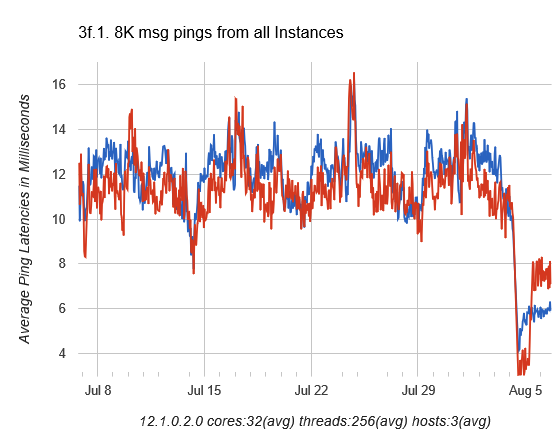
In this case, while performing a healthcheck on a system we immediately noticed an issue with the interconnect manifesting itself in AWR as long ping times between nodes as seen in dba_hist_interconnect_pings:

ping-stats-4hr-before

In my experience, in a system that has the interconnect tuned well and not a ton of cross instance traffic, these should be in the 5ms or less range.

So we started to check all of the usual suspects such as NIC and DNS issues.  One thing we did find was that the private addresses were missing from /etc/hosts so that could contribute some of the latency right?  While adding those helped smooth out the spikes, it didn’t address the entire issue.  So as part of my problem solving process, next I just started poking around with the “netstat” command to see if anything turned up there and most certainly something did:

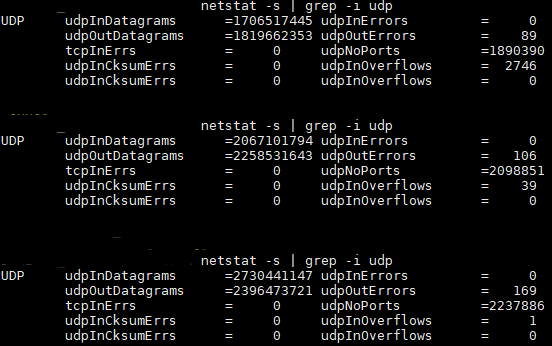
udpNoPorts-Example-pre

udpNoPorts… What’s that and why is that so high?  That led me to check prerequisites and ultimately ephemeral port ranges.  Sure enough, they were set incorrectly so the the system was waiting on available ports to send interconnect traffic thus causing additional latency.

Oracle specifies the following settings for Solaris 11 and above.  They are set using “ipadm set-prop”:

"tcp_smallest_anon_port"  = 9000
"udp_smallest_anon_port" = 9000
"tcp_largest_anon_port"  = 65500
"udp_largest_anon_port" = 65500

In this case they were set to:

"tcp_smallest_anon_port" = 32768
"udp_smallest_anon_port" = 32768
"tcp_largest_anon_port" = 60000
"udp_largest_anon_port" = 60000

If you were using Linux, the configuration parameter in “sysctl.conf” would be:

 
net.ipv4.ip_local_port_range = 9000 65500 

After correcting the settings, we were able to cut the latency in half:

ping-stats-4hr-after

Interconnect post fix

Now, we still have some work to do because the interconnect latency is still higher than desired, but we are now likely dealing with the way the application connects to the database and is not RAC aware vs. an actual hardware or network issue.

Incremental improvement is always welcomed!

Ulimit nofiles Unlimited. Why not?

I was going back through all of my notes of various things I have encountered and I one thing I have been seeing a lot of lately are ulimit settings for various installations not following the recommended defaults.  In just about every case, when I queried the team that either made or requested that setting, the standard answer was “I just didn’t want to have to worry about it, so we set it to unlimited”.  As with anything, there are reasons why certain settings are recommended and this post seeks to show you why as it relates to the ulimit kernel setting of “nofiles”.

For example, in the WebLogic documentation (as of 12.2.1.4), the ulimit requirements specifically state that the “/etc/security/limits.conf” should contain:

* soft nofile 4096
* hard nofile 65536

Interestingly enough, the Oracle database guide (as of 19c) states that the nofile soft limits should be at least 1024 and the hard nofile limits should be “at least” 65536 for both the grid user and oracle user, which is different than WebLogic.  So as you can see, one size doesn’t fit all.

One area where I saw this become important was during the boot sequence of WebLogic Tuxedo. We had an issue where sometimes a server would boot and sometimes it wouldn’t.  At the time the best we could tell was that it depended on how busy the cpu was during boot sequence and that led us to truss the “tmboot” process.  With the help of @AlexFatkulin what we found was very interesting.  We saw this message recurring over and over.

…..
25029:  close(5870682)                                  Err#9 EBADF
25029:  close(5870683)                                  Err#9 EBADF
25029:  close(5870684)                                  Err#9 EBADF
25029:  close(5870685)                                  Err#9 EBADF
25029:  close(5870686)                                  Err#9 EBADF
25029:  close(5870687)                                  Err#9 EBADF
25029:  close(5870688)                                  Err#9 EBADF
…..

This message is related directly to the the closing of “open files”.  But wait a minute, why are there open file descriptors if the application isn’t up? As part of what “tmboot” was doing during start up was trying to close all possible file descriptors regardless if the descriptor was open or not. So if ulimit -n was set to “unlimited” that resulted in 2147483647 possible open file descriptors. The boot code was then in the loop calling close from 1 to 2147483647 which was taking a very long time resulting in practically an infinite loop.  As a corrective action, we set the limit to the recommended defaults and guess what.  The server booted every single time.

It looks like setting ulimit hard “nofiles” to unlimited for WebLogic / Tuxedo exposed some bad coding practices which does not track what file descriptors it opened and instead just tries to close all possible descriptors up to the limit.

Bottom line?  Always start with the System Recommendations and go from there.  Don’t set things to UNLIMITED and think it’s a way to not have to worry about your system.  It could expose the bad coding practices of others.


Oracle Native Network Encryption

With all of the security concerns out there and data being more important than ever, it might be also time to consider encrypting your data connections, even within your own data center. If you are utilizing cloud, there should be no question that some sort of encryption should be used. In terms of what Oracle provides, you have two options, Native Encryption and SSL/TLS encryption. As of the time of this writing, both of these options are free to use and are no longer part of the Advanced Security Option. In this post, I will discuss the set-up and use of Native Encryption, with SSL/TLS to come later.

Native network encryption provided by the Oracle client is by far, the easiest to set up, so in that same context it would also be the easiest to bypass. That said, there are ways to set it up in such a way that those risks can be mitigated. Due to those same risks, Native encryption would be a great solution to use within a private data center, but not in a public or hybrid cloud scenario. SSL/TLS would be an option to pursue in a public or hybrid cloud scenario and I plan to discuss that in a future post.

Set Up:

Setup of Native encryption is pretty straight forward and easy, especially for OCI “Thick” connections and any other method that utilizes the sqlnet.ora file. In cases where that file is not utilized, there is some additional setup and I will discuss that as well.

First, it is important to understand all of the different combinations of parameters which Native encryption uses. Luckily it is only two, however, there are many different combinations and those combinations and their results are better detailed here:

Version 12.x (OCI Thick):
https://docs.oracle.com/database/121/DBSEG/asoconfg.htm#DBSEG020

Version 12.x (JDBC Thin):
https://docs.oracle.com/database/121/DBSEG/asojbdc.htm#DBSEG9609

By default, both sides of any client connection is configured to ‘ACCEPT’ an encrypted connection.  Because of this, you only have to configure one side or the other, but for safety reasons, I would recommend configuration of both sides.

In 11.2, there are a few less options in terms of encryption and checksum algorithms, so for simplicity circumstances, I will just illustrate a 12.x ‘THICK’ client connection to an 11.2.0.4 database.

To enable this option within the ‘THICK’ client:

# sqlnet.ora Network Configuration File: /u01/app/oracle/product/12.2.0/client_1/network/admin/sqlnet.ora
# Generated by Oracle configuration tools.

NAMES.DIRECTORY_PATH= (TNSNAMES, EZCONNECT)

SQLNET.ENCRYPTION_CLIENT = REQUIRED
SQLNET.ENCRYPTION_TYPES_CLIENT = (AES256)

SQLNET.CRYPTO_CHECKSUM_CLIENT = REQUIRED
SQLNET.CRYPTO_CHECKSUM_TYPES_CLIENT = (SHA1)

If you are utilizing JDBC ‘thin’ connections, then you can also set the properties within the java code itself:

prop.setProperty(OracleConnection.CONNECTION_PROPERTY_THIN_NET_ENCRYPTION_LEVEL,level);
prop.setProperty(OracleConnection.CONNECTION_PROPERTY_THIN_NET_ENCRYPTION_TYPES,algorithm);
prop.setProperty(OracleConnection.CONNECTION_PROPERTY_THIN_NET_CHECKSUM_LEVEL,level);
prop.setProperty(OracleConnection.CONNECTION_PROPERTY_THIN_NET_CHECKSUM_TYPES, algorithm);

And edit the sqlnet.ora on the server:

# sqlnet.ora Network Configuration File: /u01/app/11.2.0.4/grid/network/admin/sqlnet.ora
# Generated by Oracle configuration tools.

NAMES.DIRECTORY_PATH= (TNSNAMES, EZCONNECT)

ADR_BASE = /u01/app/oracle

SQLNET.ENCRYPTION_SERVER = REQUIRED
SQLNET.ENCRYPTION_TYPES_SERVER = (AES256)

SQLNET.CRYPTO_CHECKSUM_SERVER = REQUIRED
SQLNET.CRYPTO_CHECKSUM_TYPES_SERVER = (SHA1)

Validation:

There are a few ways to validate that encryption is actually taking place. The easiest is to execute the following SQL upon login to the database:

If no encryption is occurring, then the banner will look like this:

SQL> select network_service_banner from v$session_connect_info
  2  where sid in (select distinct sid from v$mystat);

NETWORK_SERVICE_BANNER
-----------------------
TCP/IP NT Protocol Adapter for Linux: Version 11.2.0.4.0 - Production
Oracle Advanced Security: encryption service for Linux: Version 11.2.0.4.0 - Production
Oracle Advanced Security: crypto-checksumming service for Linux: Version 11.2.0.4.0 - Production

If encryption is happening, then the banner will return additional data:

SQL> select network_service_banner from v$session_connect_info
  2  where sid in (select distinct sid from v$mystat);

NETWORK_SERVICE_BANNER
-----------------------
TCP/IP NT Protocol Adapter for Linux: Version 11.2.0.4.0 - Production
Oracle Advanced Security: encryption service for Linux: Version 11.2.0.4.0 - Production
Oracle Advanced Security: AES256 encryption service adapter for Linux: Version 11.2.0.4.0 - Product
Oracle Advanced Security: crypto-checksumming service for Linux: Version 11.2.0.4.0 - Production
Oracle Advanced Security: SHA1 crypto-checksumming service adapter

Notice the 2 additional lines in the banner when encryption is occurring:
Oracle Advanced Security: AES256 encryption service adapter for Linux: Version 11.2.0.4.0 – Product
Oracle Advanced Security: SHA1 crypto-checksumming service adapter

So the database indicates that encryption is happening, so what is actually happening on the wire? To determine that, we can either use a product like Wireshark or trace the connection to the listener. To do this, enable the following parameters in the SQLNET.ORA on the client:

DIAG_ADR_ENABLED=OFF
TRACE_DIRECTORY_CLIENT=/home/oracle/trace
TRACE_FILE_CLIENT=nettrace
TRACE_LEVEL_CLIENT=16

And in the trace filem you will see an entry similar to the following:

(3310995200) [24-APR-2017 10:19:21:077] na_tns:         Encryption is active, using AES256
(3310995200) [24-APR-2017 10:19:21:077] na_tns:         Crypto-checksumming is active, using SHA1

So as you can see, the setup of Native encryption is quite easy. As with any additional feature, performance could be compromised, so make sure you test all combinations thoroughly in order to determine what works best in your environment. Enjoy!

Local Listener vs. Remote Listener vs. Listener Networks

Introduction:

Often, when it comes to the database, you may see separate networks configured for the following types of traffic:

  • Backups
  • Management
  • Client

Recently, one of the configurations that I was a part of took it a step further than that and had a few additional networks configured:

  • Data Guard
  • Private Non-Routed Network

One additional requirement was that a scan listener be present for each one of these networks. I wasn’t given the opportunity to set this up either so we had to trust that the other entity set all of the correct parameters.  No big deal right?


The Problem:

Once all of the networks were configured and scan listeners were in place for each network, connectivity on each network was very erratic.  Clients would connect at times and at other times they would not.

It wasn’t until we used a  packet analyzer (Wireshark), that we really saw what was going on.  Upon investigation, a colleague found that occasionally the scan listener would return the wrong VIP to the connecting client.  Good news was that it was the SAME wrong VIP each time.  But why was it doing this?  The culprit ended up being incorrect / missing entries in the following parameters.

  • REMOTE_LISTENER
  • LOCAL_LISTENER
  • LISTENER_NETWORKS

The Oracle documentation on this was not a ton of help either.

The Solution:

Upon investigation, we found that an entry for each local listener was present in the LOCAL_LISTENER parameter and each SCAN_LISTENER was present in the REMOTE_LISTENER parameter and LISTENER_NETWORKS parameter was blank.  As it turns out, LOCAL_LISTENER and REMOTE_LISTENER should contain entries for those listeners present on the first network ONLY.

Incorrect Parameters:

local_listener='(ADDRESS_LIST=(ADDRESS=(PROTOCOL=TCP)(HOST=client-vip.example.com)(PORT=1534))(ADDRESS=(PROTOCOL=TCP)(HOST=vlan-vip.example.com)(PORT=1534)))'
remote_listener='client-scan:1534','vlan-scan:1534'
listener_networks=''

The LISTENER_NETWORKS parameter is responsible for registration of listeners for ALL other networks.

Correct Parameters:

local_listener='(ADDRESS=(PROTOCOL=TCP)(HOST=client-vip.example.com)(PORT=1534))'
remote_listener='client-scan:1534'
listener_networks='((NAME=netVLAN)(LOCAL_LISTENER=(DESCRIPTION=(ADDRESS=(PROTOCOL=TCP)(HOST=vlan-vip.example.com)(PORT=1534))))(REMOTE_LISTENER=vlan-scan:1534))'

Once these changes were made, the intermittent connection issues were gone and Wireshark confirmed that the listeners were returning the correct VIP for the network being requested.

Temporarily Convert FTP to SCP Using cURL

Whenever you re-host  or modernize a system, whether it be from one platform to another or from one host to another, you will usually have a laundry list of things to do one of which is migration of those pesky one off scripts and jobs.  When you are talking about jobs on a database server, more often than not, they are placed on the cron.  Consider yourself lucky if they are actually running via dbms_scheduler as this does alleviate some of workload as the schedule will be migrated during database instantiation.

Part of my normal routine when I work on these types of jobs, is to first catalog the ‘who’, ‘what’, ‘where’ and ‘why’ of each script.  It is important to do this because maybe you can document a script that wasn’t well documented before or even find a script that can be retired all together.  Once these questions have been answered, I then decide what MUST change and what SHOULD change.  One of the items that typically falls under the MUST category is migration of FTP to SCP (or equivalent).  This item is usually a MUST either, because of security concerns or because traditional FTP is no longer being installed as part of the base build build in many data centers.  The most important part of setting up SCP is the process of getting the correct ssh keys in place so that SCP can work in a ‘passwordless’ fashion.  Preferably, service accounts are created so that the ssh key of the oracle user is not spread in across too many non-database hosts and in many cases the task must be completed by someone else. Most of the time is nice and can alleviate some of your workload, but what about the times when you thought the other party did what they needed to but didn’t?  I don’t know about you, but it’s always little stuff like this that will bite you at the worst time.  So what do you do when you are in the 11th hour of a conversion, realize they ssh keys are not present, but have to get the job functioning?   Use cURL!

Code Exerpt from typical FTP inside a shell script:

#!/bin/sh
HOST='ftp.somehost.com'
USER='username'
PASSWD='password'
FILE='somefile.txt'
DEST_PATH='/tmp'

ftp -n ${HOST} <<END_SCRIPT
quote USER ${USER}
quote PASS ${PASSWD}
cd ${DEST_PATH}
put ${FILE}
quit
END_SCRIPT
exit 0


Modified code using CURL:

#!/bin/sh
HOST='somehost.com'
USER='username'
PASSWD='password'
FILE='somefile.txt'
DEST_PATH='/tmp'

curl -T $FILE -u ${USER}:${PASSWORD} scp://${HOST}/${DEST_PATH}

As you can see, this doesn’t alleviate the security concern of having clear text passwords, but if you ever find yourself in a bind, cannot get FTP or other packages installed that can help with the issue, this is a great temporary work around to get the job done. Remember this should be TEMPORARY and make sure to come back and fix it!

Enjoy!