Yearly Archives: 2021

Why Aren’t My Exadata Database Queries Performing Smart Scans?


Recently, I was performing prerequisite checks on an Exadata in preparation for the normal quarterly full stack patch and in doing so came across a section of the Exacheck with the heading “Database should not be in DST upgrade state“. Upon investigation I found that to be true:

select name, value$ from sys.props$ where name like '%DST%';

NAME			       VALUE$
------------------------------ ------------------------------
DST_UPGRADE_STATE	       UPGRADE
DST_PRIMARY_TT_VERSION	       32
DST_SECONDARY_TT_VERSION       18

Based on this, I took this as an action item to correct during the patching cycle and continued the normal checks and a quick look through recent AWRs. Is was then that I found something interesting in the “Exadata” section of the report:
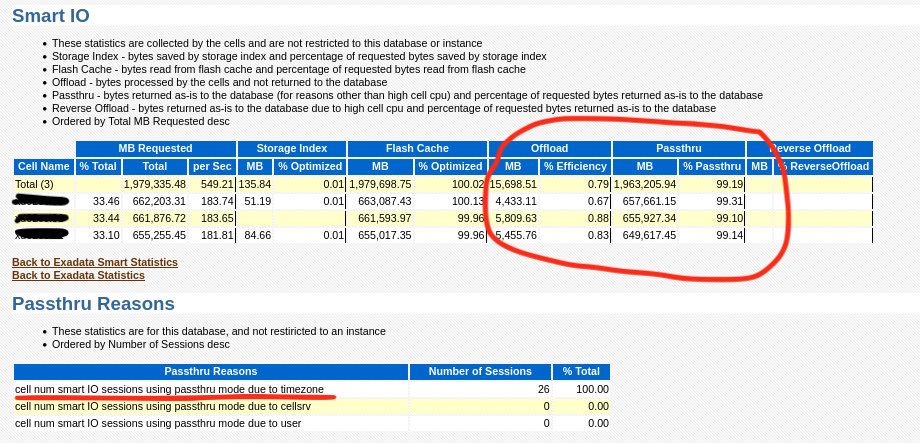
As you can see, nothing is being offloaded and in the “Passthru Reasons” section “timezone” is the culprit. I then went to look at a query or two and sure enough, that confirms it:


So sure enough a stuck timezone file upgrade can cause the entire reason you bought an Exadata not to work! The date it quit working also coincides with when an upgrade to 19c occurred. Another quick sanity check of MOS also revealed the following note:

Exadata: Database Performance Degrades when Database is in Timezone Upgrade Mode (Doc ID 1583297.1)

So now, how to fix it? The note says to try the following commands, but unfortunately that did not work:

alter session set events '30090 trace name context forever, level 32';
exec dbms_dst.unload_secondary;
BEGIN dbms_dst.unload_secondary; END;

*
ERROR at line 1:
ORA-56938: no secondary time zone data file being loaded by on-demand or a datapump job
ORA-06512: at "SYS.DBMS_DST", line 1969
ORA-06512: at "SYS.DBMS_SYS_ERROR", line 79
ORA-06512: at "SYS.DBMS_DST", line 1906
ORA-06512: at line 1

So at this point we could either try the timezone upgrade again, or try to force the timezone upgrade window to close. The following MOS note discusses the timezone upgrade process:

Updating the RDBMS DST version in 12c Release 1 (12.1.0.1 ) and above using DBMS_DST (Doc ID 1509653.1)

Due to time, I decided to try forcing the upgrade window to close (as all other indicators showed that the upgrade was successful on all other objects) and immediately we found the reason why the upgrade failed in the first place…. An invalid and UNUSED version of APEX!!!

alter session set "_with_subquery"=materialize;
alter session set "_simple_view_merging"=TRUE;
set serveroutput on
VAR numfail number
BEGIN
DBMS_DST.UPGRADE_DATABASE(:numfail,
parallel => TRUE,
log_errors => TRUE,
log_errors_table => 'SYS.DST$ERROR_TABLE',
log_triggers_table => 'SYS.DST$TRIGGER_TABLE',
error_on_overlap_time => FALSE,
error_on_nonexisting_time => FALSE);
DBMS_OUTPUT.PUT_LINE('Failures:'|| :numfail);
END;
/
VAR fail number
BEGIN
DBMS_DST.END_UPGRADE(:fail);
DBMS_OUTPUT.PUT_LINE('Failures:'|| :fail);
END;
/
SELECT PROPERTY_NAME, SUBSTR(property_value, 1, 30) value
FROM DATABASE_PROPERTIES
WHERE PROPERTY_NAME LIKE 'DST_%'
ORDER BY PROPERTY_NAME;
Table list: "APEX_040200"."WWV_FLOW_FEEDBACK"
BEGIN
*
ERROR at line 1:
ORA-04098: trigger 'APEX_040200.WWV_FLOW_FEEDBACK_T1' is invalid and failed re-validation
ORA-06512: at "SYS.DBMS_DST", line 1131
ORA-06512: at "SYS.DBMS_DST", line 611
ORA-06512: at "SYS.DBMS_DST", line 209
ORA-06512: at "SYS.DBMS_DST", line 858
ORA-06512: at "SYS.DBMS_DST", line 596
ORA-06512: at "SYS.DBMS_DST", line 1123
ORA-06512: at line 2

After following the normal process to remove those old versions of APEX (I am a believer in removing it period if you aren’t using it), I was then able to close the upgrade window for timezone with no errors:

select name, value$ from sys.props$ where name like '%DST%';

NAME			       VALUE$
------------------------------ ------------------------------
DST_UPGRADE_STATE	       UPGRADE
DST_PRIMARY_TT_VERSION	       32
DST_SECONDARY_TT_VERSION       18

alter session set "_with_subquery"=materialize;

Session altered.

alter session set "_simple_view_merging"=TRUE;

Session altered.

set serveroutput on
VAR numfail number
BEGIN
DBMS_DST.UPGRADE_DATABASE(:numfail,
parallel => TRUE,
log_errors => TRUE,
log_errors_table => 'SYS.DST$ERROR_TABLE',
log_triggers_table => 'SYS.DST$TRIGGER_TABLE',
error_on_overlap_time => FALSE,
error_on_nonexisting_time => FALSE);
DBMS_OUTPUT.PUT_LINE('Failures:'|| :numfail);
END;
/
Table list: "APEX_200200"."WWV_FLOW_WORKSHEET_NOTIFY"
Number of failures: 0
Table list: "APEX_200200"."WWV_FLOW_WEB_SRC_MODULES"
Number of failures: 0
Table list: "APEX_200200"."WWV_FLOW_ACTIVITY_LOG2$"
Number of failures: 0
Table list: "APEX_200200"."WWV_FLOW_DEBUG_MESSAGES"
Number of failures: 0
Table list: "APEX_200200"."WWV_FLOW_DEBUG_MESSAGES2"
Number of failures: 0
Table list: "APEX_200200"."WWV_FLOW_WEBSOURCE_SYNC_LOG1$"
Number of failures: 0
Table list: "APEX_200200"."WWV_FLOW_WEBSOURCE_SYNC_LOG2$"
Number of failures: 0
Table list: "APEX_200200"."WWV_FLOW_AUTOMATION_LOG1$"
Number of failures: 0
Table list: "APEX_200200"."WWV_FLOW_AUTOMATION_LOG2$"
Number of failures: 0
Table list: "APEX_200200"."WWV_FLOW_AUTOMATION_MSG_LOG1$"
Number of failures: 0
Table list: "APEX_200200"."WWV_FLOW_AUTOMATION_MSG_LOG2$"
Number of failures: 0
Table list: "APEX_200200"."WWV_FLOW_FEEDBACK"
Number of failures: 0
Table list: "APEX_200200"."WWV_FLOW_FEEDBACK_FOLLOWUP"
Number of failures: 0
Table list: "APEX_200200"."WWV_FLOW_PKG_APP_INSTALL_LOG"
Number of failures: 0
Table list: "APEX_200200"."WWV_FLOW_ACTIVITY_LOG1$"
Number of failures: 0
Table list: "APEX_200200"."APEX$ARCHIVE_HEADER"
Number of failures: 0
Table list: "APEX_200200"."APEX$ARCHIVE_CONTENTS"
Number of failures: 0
Table list: "APEX_200200"."APEX$ARCHIVE_HISTORY"
Number of failures: 0
Table list: "APEX_200200"."APEX$ARCHIVE_LOG"
Number of failures: 0
Table list: "APEX_200200"."APEX$ARCHIVE_PREF"
Number of failures: 0
Table list: "APEX_200200"."WWV_FLOW_AUTOMATIONS"
Number of failures: 0
Failures:0

PL/SQL procedure successfully completed.

VAR fail number
BEGIN
DBMS_DST.END_UPGRADE(:fail);
DBMS_OUTPUT.PUT_LINE('Failures:'|| :fail);
END;
/
An upgrade window has been successfully ended.
Failures:0

PL/SQL procedure successfully completed.

select name, value$ from sys.props$ where name like '%DST%';

NAME			       VALUE$
------------------------------ ------------------------------
DST_UPGRADE_STATE	       NONE
DST_PRIMARY_TT_VERSION	       32
DST_SECONDARY_TT_VERSION       0

Now after changing this, you can now see that the “Passthru Reasons” section is no longer populated and all cell offloads are occurring again:
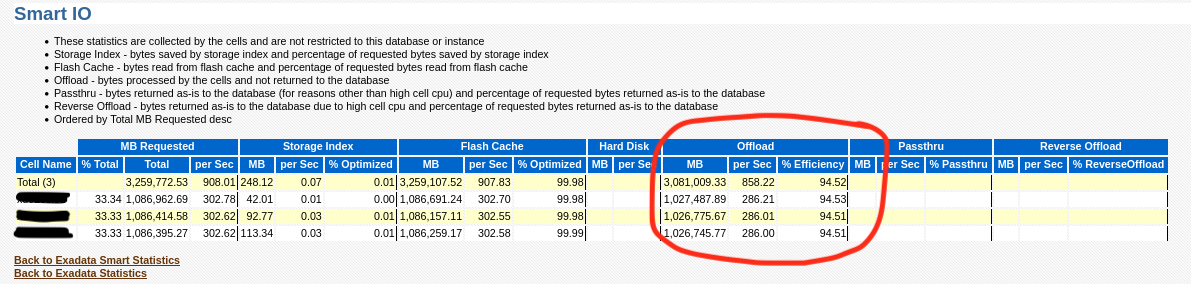
Confirming via looking at AWR also shows the query now getting proper offload:

So the moral of the story is that when performing an upgrade, take extra care to check if there are invalid objects along the way and also don’t proceed unless it is properly resolved! Also, consider removing features of the database if you are not using them. It will lessen the chance for there being outliers causing problems and your upgrade will actually complete faster!

Enjoy!

Using Python Along with the Oracle GoldenGate Big Data Adapter Integrated Heartbeat

In my previous blog post, https://stborden.wordpress.com/2021/08/27/enabling-and-use-of-the-oracle-goldengate-big-data-adapter-integrated-heartbeat/, I showed how to enable the heartbeat for the GoldenGate Big Data Adapter. In this post, we will extend this facility using python to read this data and provide lag information for the replication path over different time periods.

Python is a perfect language to iterate over the json generated by the integrated heartbeat. For ease, I have posted the script in the code block below, but it is also available on my GitHub site:

https://github.com/shane-borden/goldengate-scripts/blob/main/ogg_big_data_heartbeat_report.py


#!/bin/python3
# Python program to read ogg heartbeat history json file

import json
import time
import datetime
import os
import glob
import sys, getopt

def main(argv):
  # Initialize Variables
  vLagJsonDir = ''
  try:
    opts, args = getopt.getopt(argv,"h:j:",["jsondir="])
    if len(opts) == 0:
      print('Script Usage: ogg_big_data_heartbeat_report.py -j ')
      sys.exit(1)
  except getopt.error as err:
    print('Script Usage: ogg_big_data_heartbeat_report.py -j ')
    sys.exit(2)
  for opt, arg in opts:
    if opt == '-h':
      print('Script Usage: ogg_big_data_heartbeat_report.py -j ')
      sys.exit()
    #elif opt in ("-j", "--jsondir"):
    elif opt == '-j':
      vLagJsonDir = arg
    elif opt == '--jsondir':
      vLagJsonDir = arg

  vTotLag = 0
  vTotJsonRecords = 0
  vTotLag_1hour = 0
  vTotJsonRecords_1hour = 0
  vTotLag_4hour = 0
  vTotJsonRecords_4hour = 0
  vTotLag_8hour = 0
  vTotJsonRecords_8hour = 0
  vTotLag_24hour = 0
  vTotJsonRecords_24hour = 0
  now = time.mktime(datetime.datetime.now().timetuple())
  if vLagJsonDir == "":
    vLagJsonDir = "/u01/app/oracle/product/oggBd/19.1/gg_1/dirtmp/"
    print('JSON Dir defaulted to: ' + str(vLagJsonDir))
  else:
    print('JSON Dir is: ' + str(vLagJsonDir))
  lag_records = []
  heartbeat_timestamp_records = []
  replication_path_records = []

  # Opening JSON file
  for filename in glob.glob(vLagJsonDir + '/*-hb-[0-9][0-9][0-9][0-9]-[0-9][0-9]-[0-9][0-9].json'):
    #print(os.path.join(vLagJsonDir + "/", filename))
    f = open(os.path.join(vLagJsonDir + "/", filename))

    # returns JSON object as
    # a dictionary
    data = json.load(f)

    # Iterating through the json
    # list
    for i in data['records']:
      vIncomingTs = time.mktime(datetime.datetime.strptime(i['incomingHeartbeatTs'][:-3],"%Y-%m-%d %H:%M:%S.%f").timetuple())
      vOutgoingTs = time.mktime(datetime.datetime.strptime(i['outgoingReplicatTs'][:-3],"%Y-%m-%d %H:%M:%S.%f").timetuple())
      vIncomingHeartbeatTs = datetime.datetime.strptime(i['incomingHeartbeatTs'][:-3],"%Y-%m-%d %H:%M:%S.%f").strftime('%Y-%m-%d %H:%M')
      heartbeat_timestamp_records.append(vIncomingHeartbeatTs)
      #print(str(now - vOutgoingTs))
      if (now - vOutgoingTs)  " + i['incomingRoutingPath'] + " => " + i['incomingReplicat'] + " | " + vIncomingHeartbeatTs + " | " + str(vOutgoingTs - vIncomingTs))
        replication_path_records.append(i['incomingExtract'] + " => " + i['incomingRoutingPath'] + " => " + i['incomingReplicat'])
      elif (now - vOutgoingTs) <= 14400:
        vTotLag_4hour = vTotLag_4hour + (vOutgoingTs - vIncomingTs)
        vTotJsonRecords_4hour = (vTotJsonRecords_4hour + 1)
      elif (now - vOutgoingTs) <= 28800:
        vTotLag_8hour = vTotLag_8hour + (vOutgoingTs - vIncomingTs)
        vTotJsonRecords_8hour = (vTotJsonRecords_8hour + 1)
      elif (now - vOutgoingTs)  0:
    print("Average Lag over the past hour: " + str(vTotLag_1hour // vTotJsonRecords_1hour) + " seconds")
  if vTotJsonRecords_4hour > 0:
    print("Average Lag over the past 4 hours: " + str(vTotLag_4hour // vTotJsonRecords_4hour) + " seconds")
  if vTotJsonRecords_8hour > 0:
    print("Average Lag over the past 8 hours: " + str(vTotLag_8hour // vTotJsonRecords_8hour) + " seconds")
  if vTotJsonRecords_24hour > 0:
    print("Average Lag over the past 24 hours: " + str(vTotLag_24hour // vTotJsonRecords_24hour) + " seconds")
  print("Average Lag over the dataset (" + str(vTimeDiff) + " Days): " + str(vTotLag // vTotJsonRecords) + " seconds")

if __name__ == "__main__":
  if len(sys.argv) < 1:
    print('Script Usage: ogg_big_data_heartbeat_report.py -j ')
    sys.exit(2)
  else:
    main(sys.argv[1:])

Now, to execute the script its quite easy. Just tell the script where the json files are and it will aggregate the results over the past hour, 4 hours, 8 hours, 24 hours and the entire dataset:

oracle@orcl-vbox2:/home/oracle $ ogg_big_data_heartbeat_report.py -j /u01/app/oracle/product/oggBd/19.1/gg_1/dirtmp
JSON Dir is: /u01/app/oracle/product/oggBd/19.1/gg_1/dirtmp

Replication Paths:
E_HR_CL => P_HR_CL => RKFJSCON

Combined Lag Data for Replication Paths:

Average Lag over the past hour: 6.0 seconds
Average Lag over the past 4 hours: 6.0 seconds
Average Lag over the past 8 hours: 6.0 seconds
Average Lag over the past 24 hours: 6.0 seconds
Average Lag over the dataset (18.0 Days): 443446.0 seconds

I’ve only had my VM up for the past day or so, so the data for the entire dataset is skewed as there was a several day period where the VM was down.

Now you can extend this even further if you like to execute on a timely bases from OEM so that historical data can be kept or from any other scheduling tool you might have. Enjoy!

Enabling and Use of the Oracle GoldenGate Big Data Adapter Integrated Heartbeat

I have always found the Integrated Heartbeat for GoldenGate very useful for quickly identifying replication trends and potential slowness in the replication path. Luckily in GoldenGate Big Data Adapter Version 19c they have extended this functionality for the Big Data Adapter. My goal with this blog post is to show how easy it is to enable the heartbeat and to demonstrate a python script to utilize the data the heartbeat produces.

First, enable the heartbeat on the source just as you normally would. I won’t cover how to do that in this post, but for GoldenGate 19c, the instructions can be found here:

https://docs.oracle.com/en/middleware/goldengate/core/19.1/gclir/add-heartbeattable.html#GUID-126E30A2-DC7A-4C93-93EC-0EB8BA7C13CB

Enabling the HeartBeat for the Big Data Adapter

Luckily, enabling the heartbeat for the big data adapter is just as easy as in the normal Goldengate CLI. The official reference is here:

https://docs.oracle.com/en/middleware/goldengate/big-data/19.1/gbdin/automatic-heartbeat-bigdata.html#GUID-56DF810A-A417-45DB-A3ED-2D902B800778

For expedience, I will show the basic usage of the command here. After logging into GGSCI, enabling the target heartbeat is as easy as:

Oracle GoldenGate for Big Data
Version 19.1.0.0.8 (Build 002)

Oracle GoldenGate Command Interpreter
Version 19.1.0.0.210228 OGGCORE_19.1.0.0.0OGGBP_PLATFORMS_210212.1752.2
Linux, x64, 64bit (optimized), Generic  on Mar 18 2021 07:13:36
Operating system character set identified as UTF-8.

Copyright (C) 1995, 2021, Oracle and/or its affiliates. All rights reserved.


GGSCI (orcl-vbox2.localdomain.com) 1> ADD HEARTBEATTABLE
Heartbeat table is now enabled.
HEARTBEAT configuration file dirprm/heartbeat.properties
heartbeat.enabled=true
heartbeat.frequency=60
heartbeat.retention_time=30
heartbeat.purge.frequency=1
heartbeat.db.name=BigData

Now that the heartbeat has been enabled where does the data go? The heartbeat information (by default) is under your GOLDENGATE_HOME/dirtmp directory in the form of JSON files:

RKFJSCON-hb.json – Data for Last Heartbeat

The last heartbeat recorded looks like this:

{
“localDatabase” : “BigData”,
“heartbeatTimestamp” : “2021-08-27 13:17:14.149808000”,
“remoteDatabase” : “VBOXNCDB”,
“incomingExtract” : “E_HR_CL”,
“incomingRoutingPath” : “P_HR_CL”,
“incomingReplicat” : “RKFJSCON”,
“incomingHeartbeatTs” : “2021-08-27 13:17:14.149808000”,
“incomingExtractTs” : “2021-08-27 13:17:16.822345000”,
“incomingRoutingTs” : “2021-08-27 13:17:17.275030000”,
“incomingReplicatTs” : “2021-08-27 13:17:20.411229000”,
“outgoingReplicat” : “RKFJSCON”,
“outgoingReplicatTs” : “2021-08-27 13:17:20.412000000”
}


The every time a new heartbeat arrives the last heartbeat is written to a historical file by day up to the retention period where the data is then deleted:

{
“records” : [ {
“localDatabase” : “BigData”,
“heartbeatTimestamp” : “2021-08-27 00:00:14.110627000”,
“remoteDatabase” : “VBOXNCDB”,
“incomingExtract” : “E_HR_CL”,
“incomingRoutingPath” : “P_HR_CL”,
“incomingReplicat” : “RKFJSCON”,
“incomingHeartbeatTs” : “2021-08-27 00:00:14.110627000”,
“incomingExtractTs” : “2021-08-27 00:00:16.213547000”,
“incomingRoutingTs” : “2021-08-27 00:00:17.371348000”,
“incomingReplicatTs” : “2021-08-27 00:00:20.147079000”,
“outgoingReplicat” : “RKFJSCON”,
“outgoingReplicatTs” : “2021-08-27 00:00:20.170000000”
}, {
More json records
}, {
“localDatabase” : “BigData”,
“heartbeatTimestamp” : “2021-08-27 13:21:14.178962000”,
“remoteDatabase” : “VBOXNCDB”,
“incomingExtract” : “E_HR_CL”,
“incomingRoutingPath” : “P_HR_CL”,
“incomingReplicat” : “RKFJSCON”,
“incomingHeartbeatTs” : “2021-08-27 13:21:14.178962000”,
“incomingExtractTs” : “2021-08-27 13:21:16.602223000”,
“incomingRoutingTs” : “2021-08-27 13:21:17.675216000”,
“incomingReplicatTs” : “2021-08-27 13:21:21.481484000”,
“outgoingReplicat” : “RKFJSCON”,
“outgoingReplicatTs” : “2021-08-27 13:21:21.481000000”
} ]
}


So as you can see the heartbeat data is now in json format to be able to write alerts, OEM extensions or whatever else you see fit. Check out my next blog post on how to report on this data using a simple Python script!