Yearly Archives: 2019

Ephemeral Ports and Oracle RAC Interconnect

Building upon my previous post “Ulimit nofiles Unlimited. Why not?“, ensuring that there are enough Ephemeral Ports for Interconnect Traffic is important.  As a matter of fact, it’s part of the prerequisite checks for RAC installation.  But what are they and why are they important? For purposes of this post I won’t deal with excessive interconnect traffic, but instead I will deal with latency caused by the lack of ephemeral ports.

Simply explained, ephemeral ports are the short-lived transport protocol ports for Internet Protocol (IP) communications.  Oracle RAC interconnect traffic specifically utilizes the User Datagram Protocol (UDP) as the port assignment for the client end of a client-server communication to a well-known port list (Oracle suggests a specific port range) on a server.  What that means is, when a client initiates a request it choose a random port from ephemeral port range and it expects the response at that port only.  Since interconnect traffic is usually short lived and frequent, there need to be enough ports available to ensure timely communication.  If there are not enough ports available for the needed interconnect traffic, interconnect latency can occur.

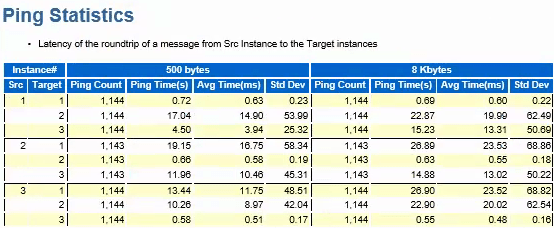
In this case, while performing a healthcheck on a system we immediately noticed an issue with the interconnect manifesting itself in AWR as long ping times between nodes as seen in dba_hist_interconnect_pings:
ping-stats-4hr-before

In my experience, in a system that has the interconnect tuned well and not a ton of cross instance traffic, these should be in the 5ms or less range.

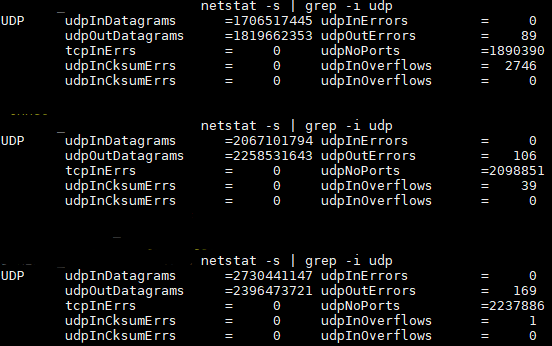
So we started to check all of the usual suspects such as NIC and DNS issues.  One thing we did find was that the private addresses were missing from /etc/hosts so that could contribute some of the latency right?  While adding those helped smooth out the spikes, it didn’t address the entire issue.  So as part of my problem solving process, next I just started poking around with the “netstat” command to see if anything turned up there and most certainly something did:
udpNoPorts-Example-pre

udpNoPorts… What’s that and why is that so high?  That led me to check prerequisites and ultimately ephemeral port ranges.  Sure enough, they were set incorrectly so the the system was waiting on available ports to send interconnect traffic thus causing additional latency.

Oracle specifies the following settings for Solaris 11 and above.  They are set using “ipadm set-prop”:

"tcp_smallest_anon_port"  = 9000
"udp_smallest_anon_port" = 9000
"tcp_largest_anon_port"  = 65500
"udp_largest_anon_port" = 65500

In this case they were set to:

"tcp_smallest_anon_port" = 32768
"udp_smallest_anon_port" = 32768
"tcp_largest_anon_port" = 60000
"udp_largest_anon_port" = 60000

If you were using Linux, the configuration parameter in “sysctl.conf” would be:

 
net.ipv4.ip_local_port_range = 9000 65500 

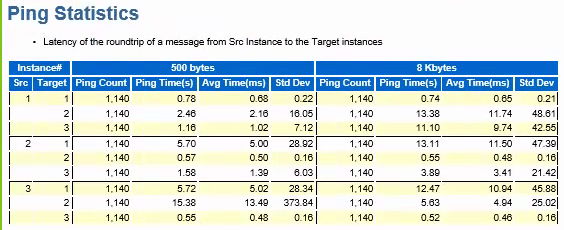
After correcting the settings, we were able to cut the latency in half:

ping-stats-4hr-after

Interconnect post fix

Now, we still have some work to do because the interconnect latency is still higher than desired, but we are now likely dealing with the way the application connects to the database and is not RAC aware vs. an actual hardware or network issue.

Incremental improvement is always welcomed!
Ulimit nofiles Unlimited. Why not?

I was going back through all of my notes of various things I have encountered and I one thing I have been seeing a lot of lately are ulimit settings for various installations not following the recommended defaults.  In just about every case, when I queried the team that either made or requested that setting, the standard answer was “I just didn’t want to have to worry about it, so we set it to unlimited”.  As with anything, there are reasons why certain settings are recommended and this post seeks to show you why as it relates to the ulimit kernel setting of “nofiles”.

For example, in the WebLogic documentation (as of 12.2.1.4), the ulimit requirements specifically state that the “/etc/security/limits.conf” should contain:

* soft nofile 4096
* hard nofile 65536

Interestingly enough, the Oracle database guide (as of 19c) states that the nofile soft limits should be at least 1024 and the hard nofile limits should be “at least” 65536 for both the grid user and oracle user, which is different than WebLogic.  So as you can see, one size doesn’t fit all.

One area where I saw this become important was during the boot sequence of WebLogic Tuxedo. We had an issue where sometimes a server would boot and sometimes it wouldn’t.  At the time the best we could tell was that it depended on how busy the cpu was during boot sequence and that led us to truss the “tmboot” process.  With the help of @AlexFatkulin what we found was very interesting.  We saw this message recurring over and over.

…..
25029:  close(5870682)                                  Err#9 EBADF
25029:  close(5870683)                                  Err#9 EBADF
25029:  close(5870684)                                  Err#9 EBADF
25029:  close(5870685)                                  Err#9 EBADF
25029:  close(5870686)                                  Err#9 EBADF
25029:  close(5870687)                                  Err#9 EBADF
25029:  close(5870688)                                  Err#9 EBADF
…..

This message is related directly to the the closing of “open files”.  But wait a minute, why are there open file descriptors if the application isn’t up? As part of what “tmboot” was doing during start up was trying to close all possible file descriptors regardless if the descriptor was open or not. So if ulimit -n was set to “unlimited” that resulted in 2147483647 possible open file descriptors. The boot code was then in the loop calling close from 1 to 2147483647 which was taking a very long time resulting in practically an infinite loop.  As a corrective action, we set the limit to the recommended defaults and guess what.  The server booted every single time.

It looks like setting ulimit hard “nofiles” to unlimited for WebLogic / Tuxedo exposed some bad coding practices which does not track what file descriptors it opened and instead just tries to close all possible descriptors up to the limit.

Bottom line?  Always start with the System Recommendations and go from there.  Don’t set things to UNLIMITED and think it’s a way to not have to worry about your system.  It could expose the bad coding practices of others.


GoldenGate Auto CDR and Off The Shelf Applications

Recently, I have been involved in completing a Proof of Concept for adding GoldenGate to an Off the Shelf (OTS) Application to facilitate keeping their DR site in sync.  This post isn’t to discuss the pros or cons of using GoldenGate for this purpose, but rather to share a few items about Auto Conflict Detection and Resolution that will prevent many OTS Applications from using this GoldenGate feature. I have also changed all references to the REAL application to the SAMPLE HR schema to protect the innocent.

This useful feature was first available with Database 12.2 and GoldenGate Version 12.3.  All in all, it is a great feature if you are looking for a database managed Conflict Detection and Resolution Methodology. You can read all about the feature here:
Automatic Conflict Detection and Resolution

One thing I will mention is that while the feature is useful, it does produce a ton of clutter in the schema you choose to deploy this feature in.  As someone who really likes to keep clutter at a minimum, you will notice the following new objects in your schema if the default options are used.  Using simplest form of Auto CDR and the HR.EMPLOYEES table as an example:

  • A new hidden column named CDRTS$ROW TIMESTAMP(6) has been added to the table
  • A new table called a Tombstone table which keeps track of delete rows DT$_EMPLOYEES is created

Now, as of this article, there have been several bugs logged with reguards to the Tombstone table and its functionality so you can choose to not use it by modifying the option TOMBSTONE_DELETES to FALSE upon running the “DBMS_GOLDENGATE_ADM.ADD_AUTO_CDR” for any given table.

It is these invisible and hidden objects which cause issues with OTS products which utilize SQL Frameworks such as:
Hibernate.  It wasn’t until we rebooted the application that we found that it simply would not come up any longer.  In the beginning we got the usual Java error message as long as your arm and we couldn’t tell what was really wrong until we enabled SQL Tracing for the processes at startup.  It was then that TKPROF showed us exactly where the problem query was:

select name,intcol#,segcol#,type#,length,nvl(precision#,0),decode(type#,2,
  nvl(scale,-127/*MAXSB1MINAL*/),178,scale,179,scale,180,scale,181,scale,182,
  scale,183,scale,231,scale,0),null$,fixedstorage,nvl(deflength,0),default$,
  rowid,col#,property, nvl(charsetid,0),nvl(charsetform,0),spare1,spare2,
  nvl(spare3,0), nvl(evaledition#,1),nvl(unusablebefore#,0),
  nvl(unusablebeginning#,0), case when (type# in (1,8,9,96,112)) then
  nvl(collid, 16382) else 0 end case, nvl(collintcol#,0), nvl(acdrrescol#, 0),
  nvl(spare7, 0)
from
col$ where obj#=:1 order by intcol#;

It is this query which the framework uses to build its object-relational mapping. Guess what. It does not filter out INVISIBLE columns as evidenced by the following error message (table / column names changed as appropriate):

ORA-01400: cannot insert NULL into (“HR”.”EMPLOYEES”.”CDRTS$ROW”)

This column is used for conflict detection and maintained by Oracle. Seeing that the application does not know what to do with it, it errors out. Perhaps the a possible remedy to this situation is to propose to the framework author to modify the query which builds the dictionary to include the following additional where clause “and col# 0”. Columns are marked invisible when the col# is 0:

select name,intcol#,segcol#,type#,length,nvl(precision#,0),decode(type#,2,
  nvl(scale,-127/*MAXSB1MINAL*/),178,scale,179,scale,180,scale,181,scale,182,
  scale,183,scale,231,scale,0),null$,fixedstorage,nvl(deflength,0),default$,
  rowid,col#,property, nvl(charsetid,0),nvl(charsetform,0),spare1,spare2,
  nvl(spare3,0), nvl(evaledition#,1),nvl(unusablebefore#,0),
  nvl(unusablebeginning#,0), case when (type# in (1,8,9,96,112)) then
  nvl(collid, 16382) else 0 end case, nvl(collintcol#,0), nvl(acdrrescol#, 0),
  nvl(spare7, 0)
from
col$ 
where obj#=:1 and col# != 0 
order by intcol#;

Once your particular SQL framework is able to properly handle invisible columns you should be able to use this useful feature. Unfortunately for my case, it will be another release or 2 before the framework we are using can handle it.